
6 posts tagged with "Devices"

View All Tags

Guided setup, device posture at a glance, and rebuilt Statistics trends

Three new dashboard surfaces this week, and a new device check.

A guided way to secure your company

The new Getting Started page helps you get more out of XFA. It lays out four tracked steps, from discovering every device to staying secure and compliant, so you always know what to set up next.
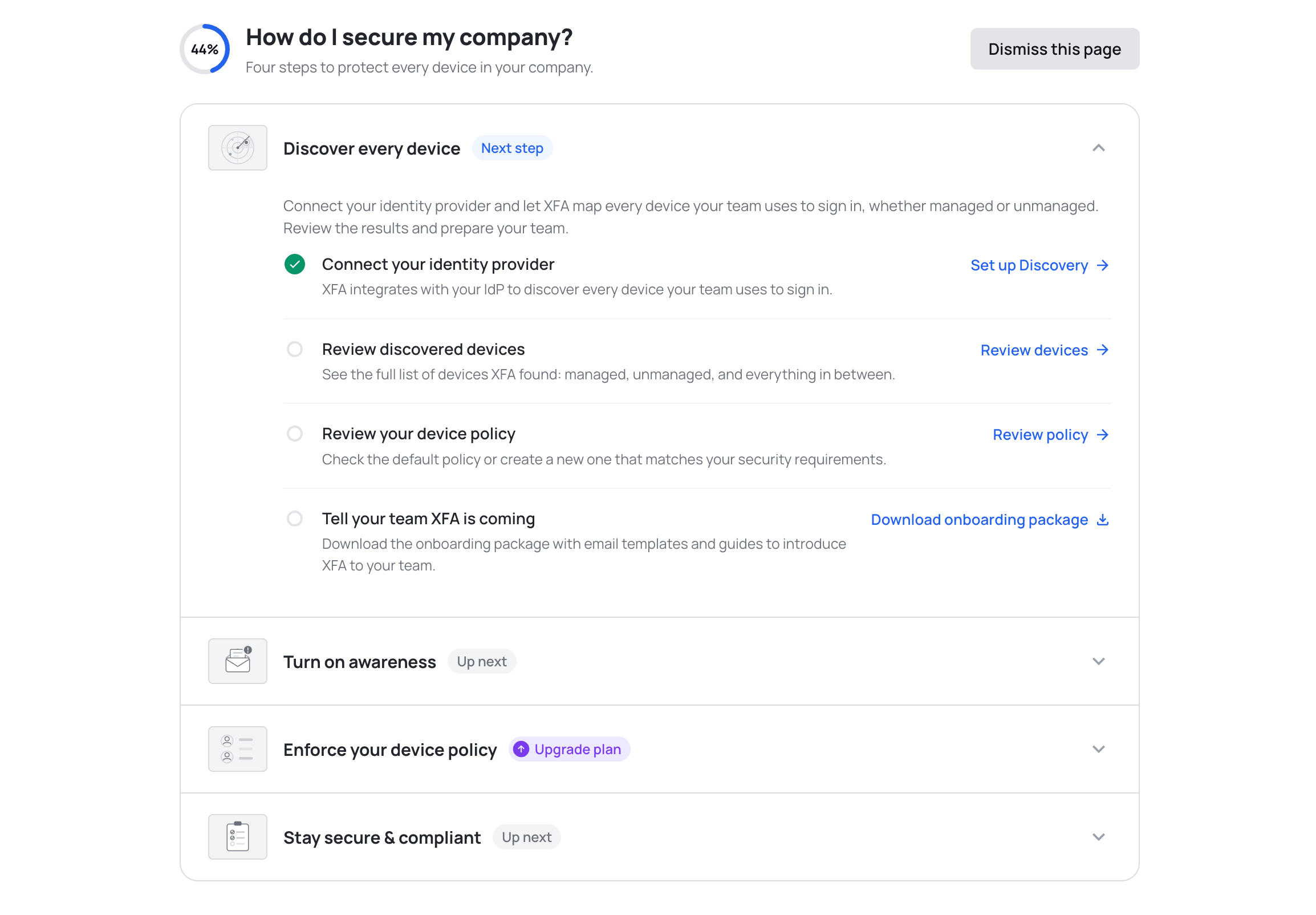
The Getting Started page showing four phases to secure your company, with the Discover every device phase expanded into four tasks: connect your identity provider, review discovered devices, review your device policy, and tell your team XFA is coming

See where Discovery, Awareness and Enforcement stand

The Devices page now opens with a card for Discovery, Awareness and Enforcement, so you can see at a glance where your organization stands. Each card says whether that pillar is running or waiting on you, with the number behind it: devices discovered, alerts sent, successful sign ins. See the Devices overview
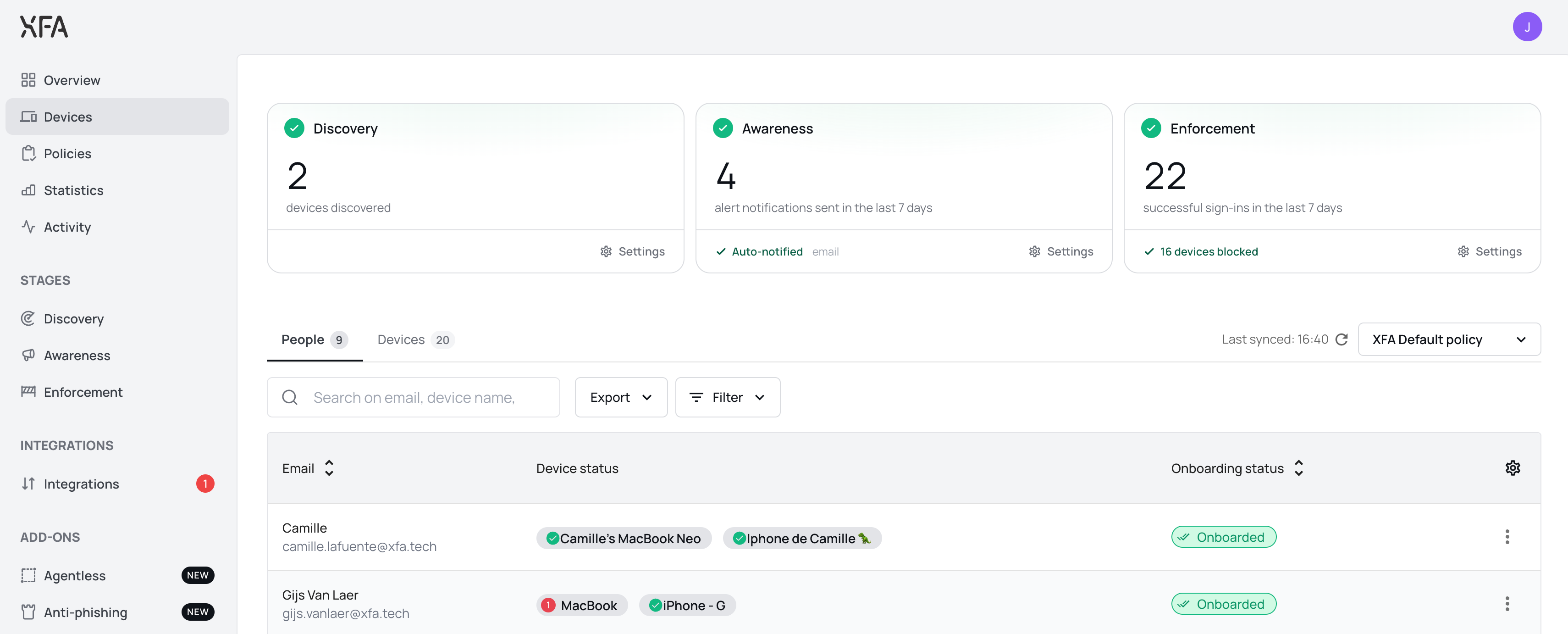
The Devices page with three pillar cards across the top: Discovery with devices discovered, Awareness with alert notifications sent in the last seven days, and Enforcement with successful sign ins in the last seven days, above the People and Devices tabs

Trends are now a single card: four tiles act as tabs above one chart, with the period, the operating system filter and the chart type on the card instead of in a fullscreen modal. Custom date ranges are supported, and the BETA labels are gone.
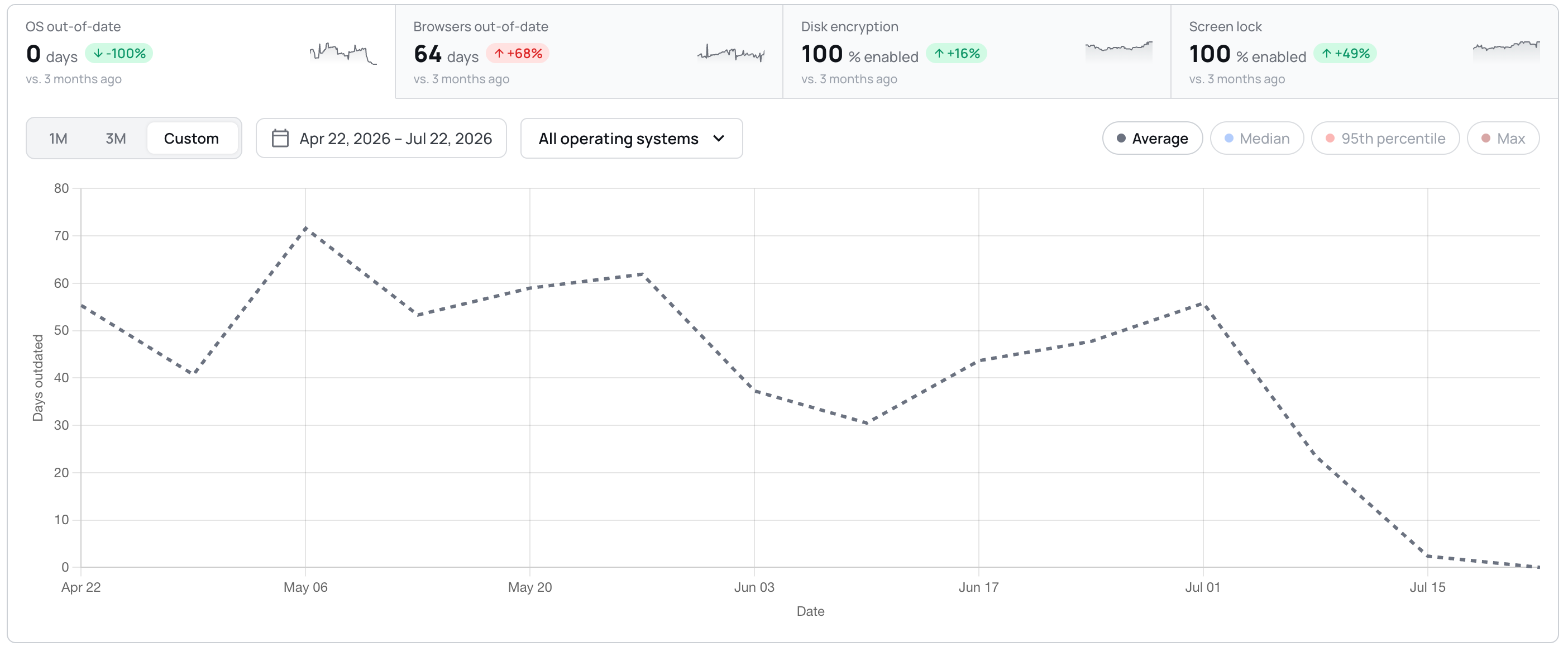
The Statistics trends card with four tiles acting as tabs, OS out of date, browsers out of date, disk encryption and screen lock, above a line chart of days outdated over a custom April to July date range

Unattended remote access, visible on the device

The device detail view now reports whether a device allows unattended remote access, and explains what the check looks for. You can act on it in your policy; XFA does not change the setting on the device. See your device policy

  • Dashboard: a Discovery integration that was never connected now shows a red alert and a Reconnect button, and counts towards the Discovery badge.
  • Dashboard: smaller interface fixes throughout, including larger tooltip and dismiss targets, steadier invoice rows, and long organization names that truncate instead of pushing controls off screen.
  • Dashboard: the Discovery page no longer shows a next run in the past. It is now anchored to the coming hour.
  • Dashboard: confirming a delete no longer leaves the button spinning. The dialog closes once the delete succeeds, and shows an error if it fails.
  • Desktop: the screen lock timeout row now shows a warning icon when the check fails on the timeout, instead of staying green while the check warns.
  • Desktop: the OS updates check now follows your policy grace in the app, the systray and the web flow alike.
  • Desktop: eighteen strings in the check details and fix actions are now translated in German, Spanish, French and Dutch, instead of falling back to English.
  • Mobile: approving MFA on another device no longer leaves the mobile app waiting.

Lost connection status for devices

Administrators now get a clearer signal when a device with the XFA agent stops reporting a verified status. The Devices overview highlights these devices as Lost connection, making it easier to spot endpoints that need to reconnect and complete verification again.

You can filter by the new status in both the Devices and People views, then request verification from the Dashboard to help the user reconnect the XFA app and resume sharing device security status.

Learn more about device verification statuses

Claude Code 'Auto' mode flagged as unsafe AI configuration

XFA's unsafe AI mode check now recognises Claude Code's newer persisted permission modes alongside the legacy dangerouslySkipPermissions flag, so administrators get accurate reporting whenever an agent is configured to auto-approve every tool call.

The following values of permissions.defaultMode in ~/.claude/settings.json (or ~/.claude/settings.local.json) are now flagged as unsafe because they auto-approve every tool call, including shell commands and network requests:

  • bypassPermissions — persisted equivalent of running with --dangerously-skip-permissions. Treat this as 'agent has full local user privileges'.
  • auto — the new Claude Code 'Auto' mode. Same risk class: skips permission prompts via a classifier and is intended for sandboxed CI, not for personal devices.

Both modes are unsafe to run on machines with credentials or production access. Safe values (default, plan, acceptEdits) remain unflagged. Devices configured with either flagged mode are now reported in the Unsafe AI Mode check, and end users see remediation steps in the in-app guide.

Review your AI policies

OPAL/SED hardware disk encryption detection on Linux

XFA's Linux disk-encryption check now recognises TCG OPAL self-encrypting drives* alongside LUKS.

When drive locking is enabled on an OPAL-capable drive, the device counts as encrypted, giving administrators accurate compliance reporting for Linux devices that rely on hardware encryption.

Review your disk-encryption policy

*Detection covers TCG OPAL 1.x and 2.x drives reported by sedutil-cli. Non-OPAL SED variants (TCG Pyrite, Ruby, and Enterprise SSC) and OPAL drives whose locking has not been activated are not recognised as encrypted.

VeraCrypt system encryption detection (Windows)

XFA's Windows disk-encryption check now recognises VeraCrypt system-drive encryption* alongside BitLocker.

Devices whose Windows boot/system drive is encrypted with VeraCrypt are now reported as compliant automatically, no configuration required.

Review your disk-encryption policy

*Detection covers VeraCrypt system (boot-drive) encryption on Windows. VeraCrypt partition and file-container volumes are not recognised by this check.

AppArmor detected as Linux integrity protection

XFA's Linux integrity protection check now recognises AppArmor as a valid mandatory-access-control system, alongside SELinux.

Linux users who rely on AppArmor as their kernel-level integrity protection now pass the check automatically.