
3 posts tagged with "Discovery"

View All Tags

Guided setup, device posture at a glance, and rebuilt Statistics trends

Three new dashboard surfaces this week, and a new device check.

A guided way to secure your company

The new Getting Started page helps you get more out of XFA. It lays out four tracked steps, from discovering every device to staying secure and compliant, so you always know what to set up next.
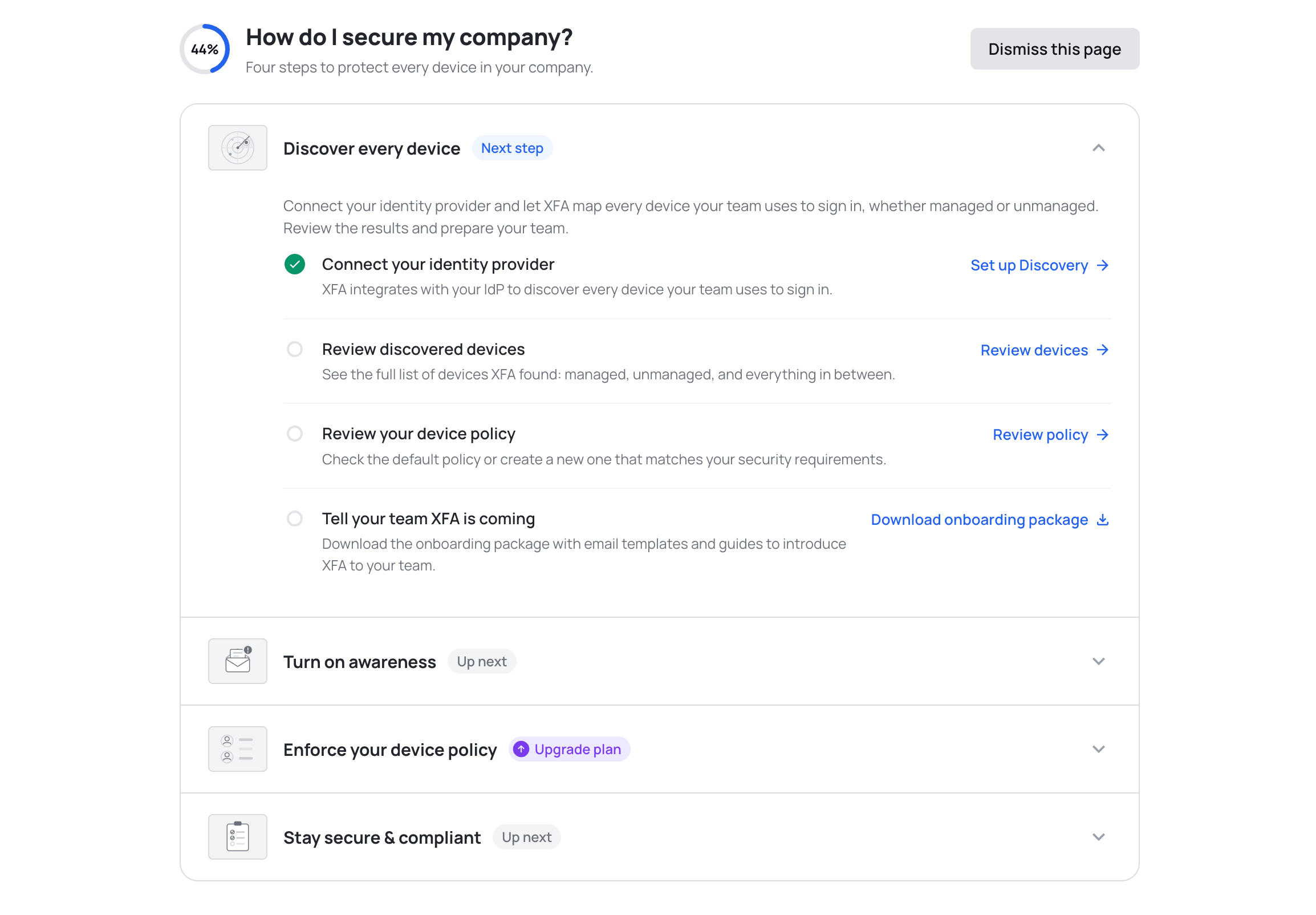
The Getting Started page showing four phases to secure your company, with the Discover every device phase expanded into four tasks: connect your identity provider, review discovered devices, review your device policy, and tell your team XFA is coming

See where Discovery, Awareness and Enforcement stand

The Devices page now opens with a card for Discovery, Awareness and Enforcement, so you can see at a glance where your organization stands. Each card says whether that pillar is running or waiting on you, with the number behind it: devices discovered, alerts sent, successful sign ins. See the Devices overview
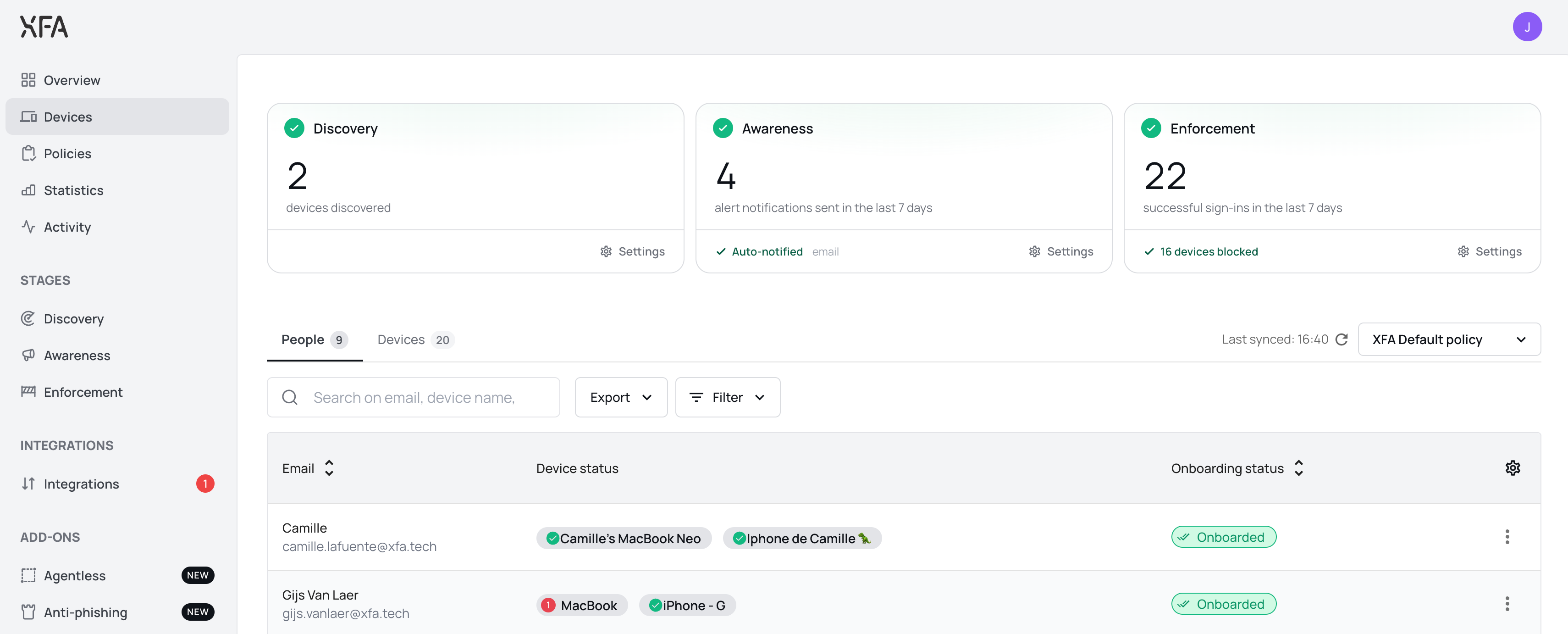
The Devices page with three pillar cards across the top: Discovery with devices discovered, Awareness with alert notifications sent in the last seven days, and Enforcement with successful sign ins in the last seven days, above the People and Devices tabs

Trends are now a single card: four tiles act as tabs above one chart, with the period, the operating system filter and the chart type on the card instead of in a fullscreen modal. Custom date ranges are supported, and the BETA labels are gone.
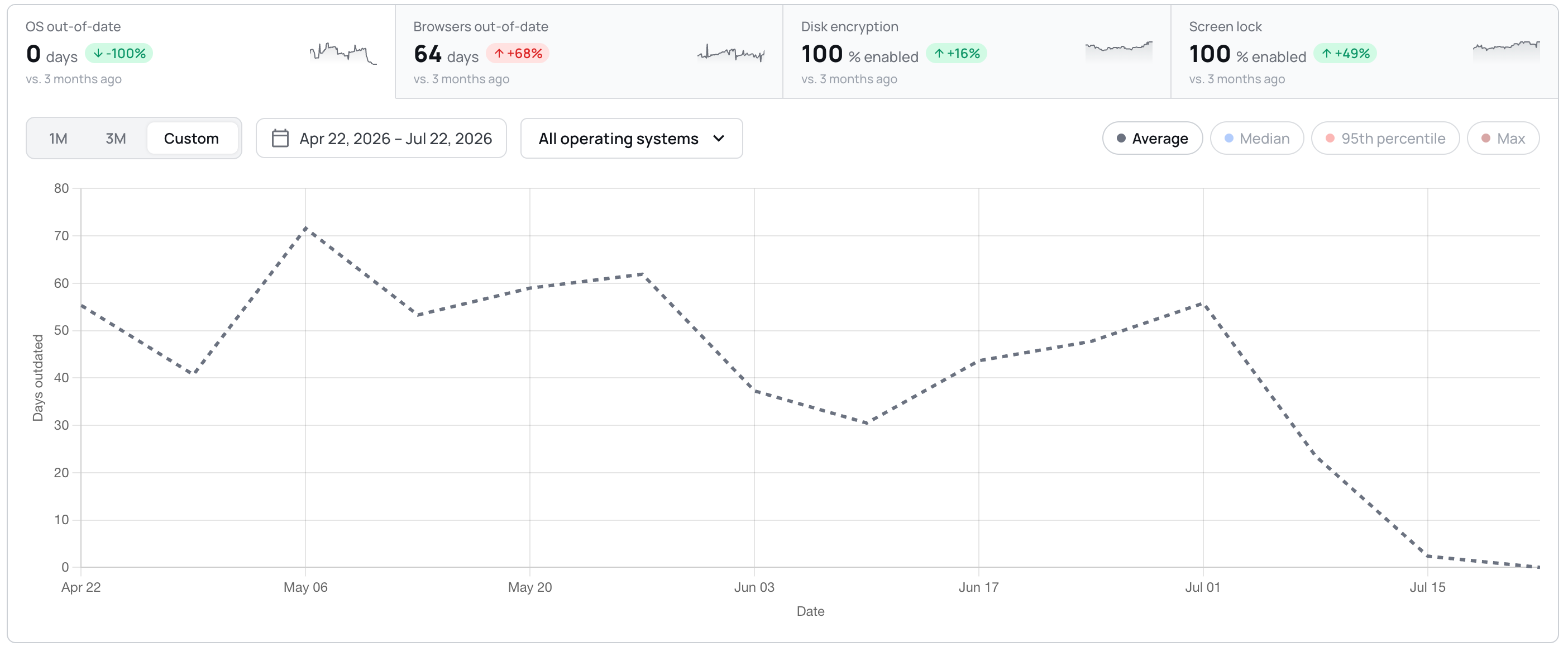
The Statistics trends card with four tiles acting as tabs, OS out of date, browsers out of date, disk encryption and screen lock, above a line chart of days outdated over a custom April to July date range

Unattended remote access, visible on the device

The device detail view now reports whether a device allows unattended remote access, and explains what the check looks for. You can act on it in your policy; XFA does not change the setting on the device. See your device policy

  • Dashboard: a Discovery integration that was never connected now shows a red alert and a Reconnect button, and counts towards the Discovery badge.
  • Dashboard: smaller interface fixes throughout, including larger tooltip and dismiss targets, steadier invoice rows, and long organization names that truncate instead of pushing controls off screen.
  • Dashboard: the Discovery page no longer shows a next run in the past. It is now anchored to the coming hour.
  • Dashboard: confirming a delete no longer leaves the button spinning. The dialog closes once the delete succeeds, and shows an error if it fails.
  • Desktop: the screen lock timeout row now shows a warning icon when the check fails on the timeout, instead of staying green while the check warns.
  • Desktop: the OS updates check now follows your policy grace in the app, the systray and the web flow alike.
  • Desktop: eighteen strings in the check details and fix actions are now translated in German, Spanish, French and Dutch, instead of falling back to English.
  • Mobile: approving MFA on another device no longer leaves the mobile app waiting.

Stronger mobile checks at sign-in, and a smoother dashboard

This week strengthens what XFA checks on mobile devices at sign-in, and makes the dashboard feel lighter and more responsive.

Mobile devices bring more to the sign-in check

The checks that flag a jailbroken, rooted or developer-mode device, or one that was just rebooted, already ran in the XFA app and showed in your dashboard. They now also reach the access decision at sign-in for mobile devices, so a risky mobile device is warned or blocked at login per your policy, the same way it already is on desktop. Nothing new is installed: the mobile app simply reports these signals when it verifies the device at sign-in. See your device policy

  • Dashboard: a lighter, more responsive feel, with smoother transitions, clearer hover and loading states, skeleton placeholders while data loads, and success confirmations that appear only once an action has actually saved. Motion respects your reduced-motion setting.
  • Dashboard: notifications are rebuilt to be calmer and more legible, and no longer duplicate, flicker or jump when several arrive at once.
  • Dashboard: Discovery and Enforcement now have a Watch demo action that opens a short guided tour without leaving the dashboard.
  • Desktop: the device-lock check now applies your organization's maximum screen-lock timeout, so it no longer shows OK in the app while sign-in is actually being blocked.
  • Desktop: the OS updates check on Fedora Linux is much faster, and no longer reports a device as out of date right after a reboot before its update data is ready.
  • Dashboard: setting up Google Workspace discovery no longer skips the domain-wide delegation step. You now confirm delegation is configured before continuing.
  • Web app: MFA and TOTP sign-in are more reliable. Trusted devices register after approval, malformed device tokens are refreshed instead of failing, and TOTP email confirmation links open the right step.
  • Dashboard: fixed a rare case where the dashboard could get stuck reloading right after a new version was deployed.
  • Dashboard: fixed a redirect loop that could bounce you back and forth during MFA sign-in.
  • Dashboard: blocked-account access handling is more consistent, and you now review your billing details before checkout.
  • Dashboard: an invited user's signup now always uses the invited email address, even if an earlier unfinished signup was left in the browser.

Clearer policy settings and a redesigned Discovery

This week is about making setup clearer: you can see exactly when an Enforcement policy warns or blocks, and adding a Discovery connection is simpler.

See exactly when a device is warned or blocked

Setting up an Enforcement policy no longer means guessing what will happen. The policy settings now show a threshold timeline and a live timing summary as you edit, plus suggestion chips for common warn and block windows. You can see precisely when a device would be warned, and when it would be blocked, before you save. Enforcement stays configurable: a policy can warn or block, with or without an Awareness notification. Set up a policy

A simpler way to connect Discovery

Discovery has a redesigned two-column overview and a clearer way to add a connection. Selecting Add connection now opens a provider picker for Microsoft, Google or Okta and takes you straight to a step-by-step setup page for the one you chose. Discovery reads the devices in your organization from a connected identity provider, so adding one is the first step to seeing every device in use. Connect Discovery

  • Dashboard: the Devices table now shows whether a device's Last Seen came from the XFA agent or from Discovery.
  • Dashboard: billing details and the change-address flow moved into a redesigned Subscription section, and adding a payment method now asks you to pick a plan first when none is active.
  • Dashboard: an account blocked for billing can still open Settings to download its invoices.
  • Dashboard: the Overview shows its shell and skeletons immediately for a faster first load, removing the blank white first paint.
  • Dashboard: the onboarding language switcher now uses the shared dropdown for a consistent look.
  • Integrations: you can now disconnect a Microsoft Teams connection from the Integrations page, the same as Slack.
  • Web app: the install and MFA screens have a refreshed layout and clearer copy.
  • Dashboard: the app now reloads itself once after a deploy instead of erroring on a stale page chunk.
  • Dashboard: the device-notify popup hides right away after you choose Don't show again.
  • Integrations: reconnecting Vanta no longer fails with a 500 error.